

What Is Indexing in SEO?
In SEO, indexing refers to the process by which a search engine like Google crawls a website’s pages, analyzes them, and stores them in its database—called the “index.”
This index is what allows search engines to retrieve and display pages in search results (SERPs) whenever a user performs a query.
Crawling vs. Indexing: What’s the Difference?
Technically, indexing happens after an essential first step: crawling.
During this phase, indexing robots such as Googlebot navigate from link to link to visit pages, collect their content, and gather metadata.
The collected data is then sorted and evaluated (based on quality and relevance) before being stored in the search engine’s index.
In short:
- Crawling: the discovery phase, where bots visit pages to extract data.
- Indexing: once the data is collected, it’s stored and organized in the index.
A page may be crawled but remain unindexed—for several reasons that we’ll explore later.
Why Indexing Is Essential for Your SEO
Indexing plays a central role in your website’s visibility on search engines. Without it, even the best content remains invisible to users.
Simply put, if a page isn’t indexed, it cannot appear in search results. That’s why indexing is a critical step in any SEO strategy.
However, being indexed doesn’t automatically guarantee a high ranking.
To summarize, indexing is crucial for:
- Visibility: only indexed pages can appear in results, increasing your chances of attracting opportunities and potential clients.
- Organic ranking: indexing is the starting point for climbing the SERPs.
- Organic traffic: a site that generates steady visits without relying on ads is likely a well-indexed site.
The Steps in the SEO Indexing Process
The indexing of a website follows three main steps: crawling, analysis, and storage.
This process enables search engines to discover, understand, and classify pages to make them visible in results.
1. Crawling
Everything begins with crawling. Search engine robots—also known as spiders or crawlers—browse the web in search of new pages.
They follow both internal and external links, and they also parse sitemaps to find as much content as possible.
Their mission:
- Detect new pages that have been published.
- Identify updates to existing pages.
- Collect information through links.
A strong internal linking structure (links between pages on the same site) greatly facilitates this crawling process.
2. Analysis
After crawling comes analysis. The search engine examines the collected elements to extract key information.
This analysis helps Google understand the topic, structure, and relevance of the page in relation to user queries.
3. Storage
Finally, the collected data is stored in a massive database called the index.
Think of the index as a huge library where each page is classified according to its topic, quality, and relevance.
When you perform a search, Google queries this index to find pages containing the searched terms. It then analyzes them based on various SEO factors to show the most relevant results.
Note: Only pages considered relevant and high-quality are kept in the index. Others are simply ignored.
Before Anything Else: Make Sure Your Pages Are Technically Indexable
Before thinking about indexing—or SEO—you need to make sure your technical foundation is solid.
A non-indexable page will never appear in Google, no matter how good its content is.
1. Fix Blocking Technical Errors
Certain technical issues can prevent bots from accessing or understanding your pages, meaning they won’t be indexed.
Common issues include:
- Broken links (404 errors): If a page returns a 404 (Not Found) or 500 (Server Error), it will be ignored by search engines.
- Bad or looped redirects.
- Server problems preventing pages from loading correctly.
You can:
- Detect these errors using tools like Google Search Console or Screaming Frog.
- Properly configure your redirects and ensure the server responds correctly.
2. Check for “noindex” Tags
A single noindex tag is enough to tell Google, “Don’t show this page in search results.”
Make sure it’s not mistakenly added to pages you want indexed.
3. Optimize the Robots.txt File
The robots.txt file tells crawlers which pages they’re allowed to explore on your site.
A bad configuration could block important pages and limit their indexing.
Check it regularly—only the pages you truly want to exclude should have the “disallow” directive.
- Strengthen Internal Linking
As mentioned earlier, internal linking means connecting your pages through links.
It’s an excellent way to guide indexing bots to your site’s most important pages. Add links between your content to structure your site and make it easier for search engines to crawl and index.
How to Check if a Page Is Indexed by Google
It’s important to verify that the pages you want to rank are actually included in Google’s index. To do so, there are two well-known methods:
Check with the “site:” Operator
Type site:yourdomain.com into Google’s search bar. You’ll see a list of all the pages from your site that have already been indexed.
If no results appear, it means Google hasn’t yet indexed your site—or certain pages of it.
Using Google Search Console
Free and highly reliable, Google Search Console is the go-to tool for monitoring and optimizing the indexing of your content. It shows in detail which pages are properly indexed—and which ones have issues.
Here’s how to check:
- Log in to your Google Search Console account.
- Go to the “Indexing” → “Pages” tab.
- Review the report to see which pages are valid or blocked.
- Use the “URL Inspection” tool to check a specific page.
Advantages:
- Quickly detect errors that prevent indexing.
- Manually request indexing for a page that hasn’t been taken into account.
Custom Tools Using Google Sheets
You can also automate the monitoring of your site’s indexing status using Google Sheets combined with simple scripts.
It’s a practical way to keep track of which pages are indexed.
Optimizing Your Website for Indexing: Best Practices
Natural indexing depends on a set of best practices that help Google better crawl, understand, and store your pages.
Certain obstacles to crawling or comprehension can prevent search engines from doing their job effectively.
Duplicate Content and Canonical Tags
Duplicate content—whether it appears on several pages of the same site or is copied elsewhere—creates confusion for search engines.
Google may struggle to determine which version to display, which can lead to the de-indexing of some pages.
Even when using canonical tags, indexing issues may persist if they’re misconfigured.
These tags tell Google which version of a page to prioritize when similar content exists elsewhere on your site.
Make sure your canonical tags always point to the correct pages, and remove any unnecessary duplicate content.
Optimize Page Quality
Each page should provide real added value and follow SEO best practices.
Original, well-structured, and relevant content is far better understood and valued by Google.
Why Publishing Frequently Speeds Up Indexing
Search engines pay special attention to active websites.
When you regularly publish high-quality content, you send positive signals to crawlers.
As a result, they come back more often to explore your site, which increases the chances of your new pages being indexed quickly.
Loading Speed and Mobile Optimization: UX and Mobile-First Are
Essential
Search engines favor pages that are fast, smooth, and mobile-friendly.
Conversely, a slow or poorly optimized page may be deprioritized or even skipped during indexing.
Common causes:
- Slow loading times
- Poor mobile display
- Too many scripts or heavy elements on the page
Simple fixes:
- Use Google PageSpeed Insights to identify and fix performance issues.
- Compress images, lighten your code, and remove unnecessary resources.
- Adopt a mobile-first approach—your site should be designed primarily for small screens.
A fast, well-optimized site not only offers a better user experience but also makes indexing easier.
Google gives priority to websites that load quickly, especially on mobile devices.
Get Backlinks
Inbound links (backlinks) play a key role in indexing.
Crawlers follow these links to discover new pages.
When other reputable websites link to yours, Google interprets it as a signal of quality.
High-quality backlinks help your content gain credibility in the eyes of search engines, making it more likely to be indexed.
How to Ask Google to Index Your Pages
Submit a URL Manually
In Google Search Console, you can use the URL Inspection Tool to request indexing for a specific page.
This is a great first step if you’re facing indexing issues.
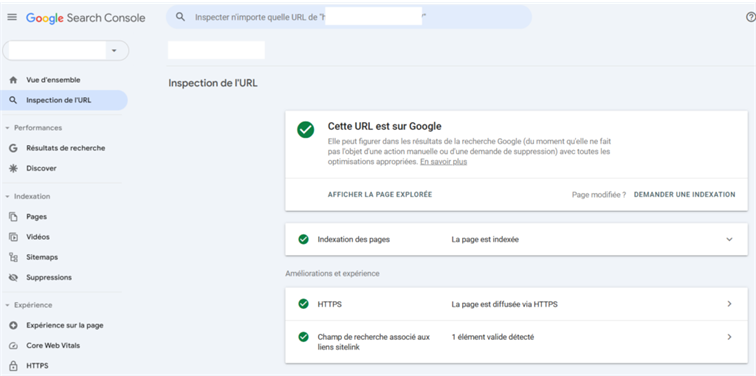
You can also resubmit your sitemap to encourage Google to crawl your site—especially when several new pages have just been added.
Create and Submit a Sitemap
A sitemap is an XML file that lists the key pages of your website.
It helps Google’s crawlers understand what they should explore and index more efficiently.
This file acts like a roadmap—it guides Google in discovering your content, including deeper pages that might not be easily accessible through internal links.
Source : Backlinko
How to proceed:
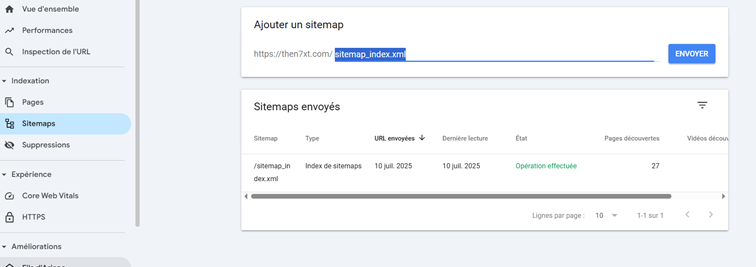
- Generate your sitemap using a tool or plugin such as Yoast SEO.
- Go to Google Search Console → “Sitemaps”, and submit your sitemap file there.
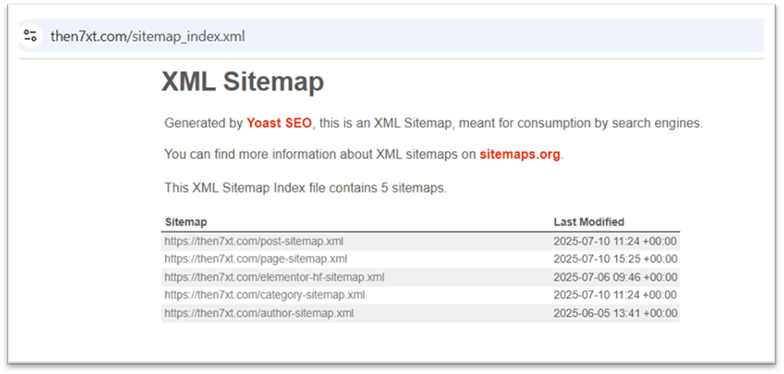
Note:
Normally, when you install the Yoast SEO plugin, it automatically replaces WordPress’s native sitemaps with a sitemap generated by Yoast.
FAQ
How to Force Indexing in Google Search Console?
- Use the URL Inspection Tool and click “Request Indexing” for a specific page.
- You can also generate and submit your sitemap to notify Google about multiple pages at once. (See more details in the article…)
How Long Does It Take for a Page to Be Indexed?
The indexing time depends on several factors: how frequently your site is updated (new content), its structure, and the overall quality of the content.
- If you use Search Console to request indexing, it may take anywhere from a few hours to a few days.
- Without any manual action, the process may take several weeks.
